Making Hot Trash Summer

Hey there I'm back!
CJ and I spent our free time the 15th to the 25th working on a game for Jimothy Jamothy, a game jam hosted by the Seattle Indies. So I'm proud to present you our entry: Hot Trash Summer!
It was sooooo fun and funny working on it. CJ actually came up with the idea of making a dating game where you try to woo Jimothy, and ya girl has played many otome games in her youth, so there was absolutely no way I was going to say no to that and I dived in head first.
Picking a Canvas, Deciding the Tools
It was really fun figuring out how we were going to work on this project together and what bits and pieces we needed to get the game going. On Day 1 we were trying to decide what game engine to use, Godot or Unity. Unity is my daily driver so I was down to use this as an opportunity to learn Godot, but CJ had an idea to use video playback and that kinda forced our hands to use Unity since there weren't a lot of proven cases for using Godot successfully with that. We were also considering whether to use a more Visual Novel friendly engine like RenPy, but the video aspect came up again — and also CJ wanted to see if he could do a small battle system or mini games, so it was back to Unity again since we knew we would face less onboarding struggles to get our goals done.
Ok so game engine is Unity, but how are we going to do the dialog system? Ya know, kinda the most important part of an otome game? In the past a game dev friend of mine, Zac, recommended using Yarn for dialog stuff. I also remember going to a storytelling talk at GDC and a couple of people there also mentioned Yarn — back then I had no idea what they were talking about tbh, and I was super overwhelmed because like a typical GDC noob, I signed up for way too many talks to go to hahaha. Anyway, we looked into Yarn Spinner and decided this was a great opportunity to check it out and mess around with it. CJ did almost all the writing, I just wrote some of the item descriptions, and he seemed to have a pretty good handle on it, so it's pretty first-time-user friendly, and super flexible!
Doing What We Thought Was Fun
On Day 3 while out on a walk after work, I was asking CJ what I could do that night on the game. He mentioned that it'd probably be a good idea to get the inventory system up and running. Nodding my head in agreement I was like "Yeah that sounds like a good task, what's the inventory look like for Yumi? What if… What if it was one of those THANK YOU THANK YOU THANK YOU bags you get from the store? That would be soooo funny, she's just walking around the city with a bag full of garbage, AHAHAHA".


Well… Let me tell you, the inventory system did not go up that night. Instead, I had CJ hold an HMart bag with the label side turned away, took a video of the bag while he held it open, and did a video of me "zooming in" to the bag. Then I spent the next 4 hours rotoscoping that and badly trying to recreate the bag handles as I got closer, because I didn't realize they were out of frame — and this was the first time I ever rotoscoped anything, so I didn't realize what I didn't realize about having a good source video, WHOOPS.
This was the rotoscoped product:
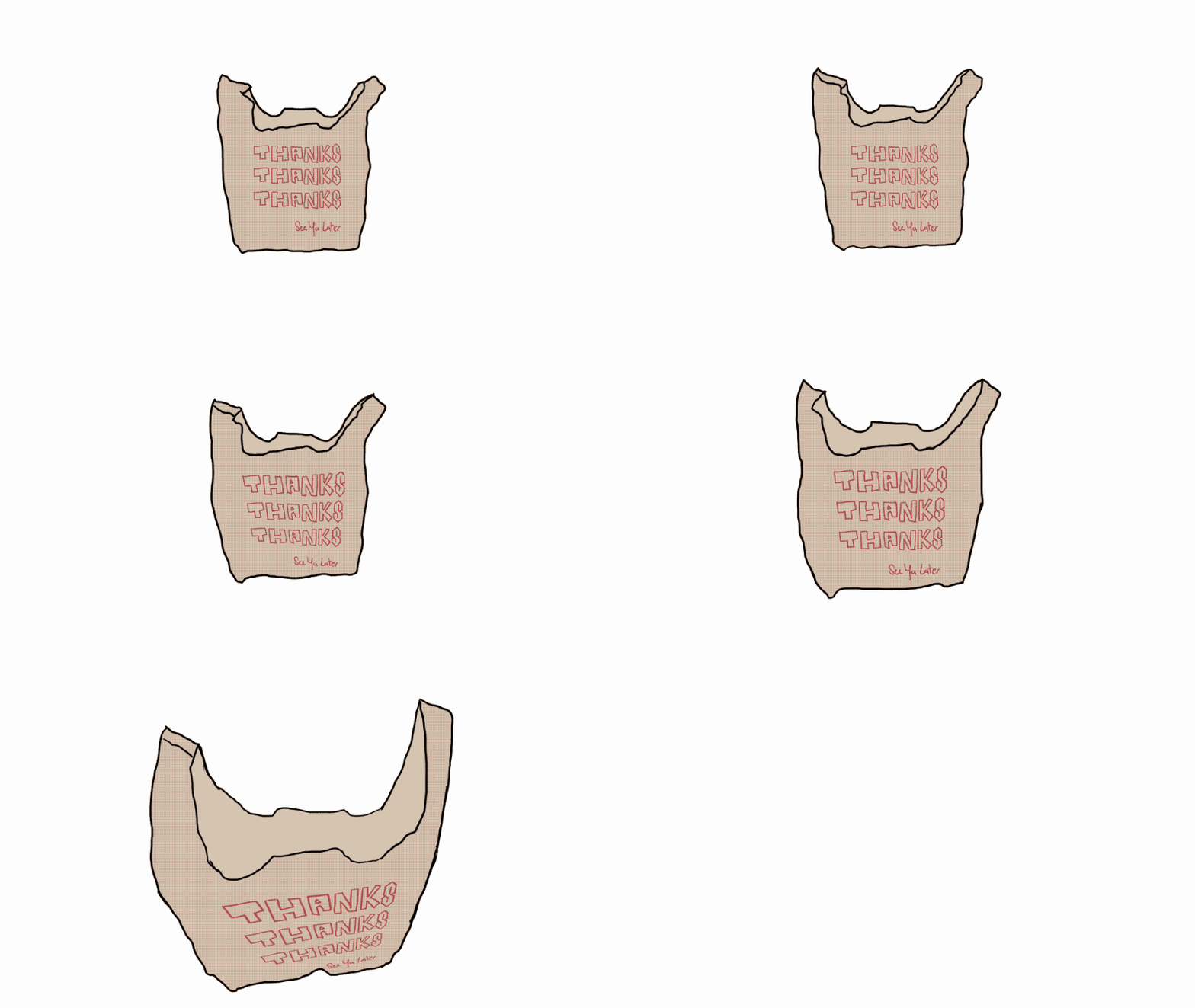
Unity's Animator/Animation system was particularly kinda fussy about reusing the zoom-in animation and just reversing it but sped up: various online sources mentioned just putting a negative value in the playback speed, but it ended up actually having to be an Animation parameter that you had to feed into the multiplier property and that took a bit of time and exasperation to find out. By the end of Day 3, I had this sick animation and was exhausted. And then on Day 4 I got the first version of our inventory screen up:
I tried to use Unity's 2D Sprite tiling to make the dialog box, but it just wasn't the tool for what I was trying to do, and it took me like wayy too long to wrap my head around what exactly the tile palette actually was. It's all pretty cool though — if I ever made a 2D sprite game I'd consider trying that out again. I tried to make the dialog box look like "wood with moss growing on it" but it was a bit too clunky, and the dialog was hard to read, and it clashed with everything. So I asked CJ to please draw up a UI concept and he came back with this:

His concept was that we the player were watching one of those corny after-school high-school drama shows, so our perspective was that of a kid watching TV in the 90s/00s. I loved the idea, and then kinda probed him about like "when do we see the buttons and when do we see the dialog, what about the volume buttons, do they have to stay? the bag button is all the way up there and we have a 'Gift' button too, can we yeet the bag icon?" You know, all those annoying questions that idea guys love to hear lmao.
Then, while trying to find TV reference photos, I remembered the TV we used to have in my sister and I's shared room. It was a TV with an integrated VHS player — we watched many many many runs of Mulan on VHS on that thing. I looked up "TV + VHS Player" and voila, there was a slightly newer version of the one we had.

I just had to find out how to make CJ's concept fit into this kind of TV. So I copied over his stuff onto the TV reference to get an idea of how the layout could be approached. Also, we were still trying to figure out whether to show the buttons or not while the dialogs happened, so I made the two variants.


Finally we settled on "actions only happen when there's no dialog" — I think that was a nice clean decision. CJ cited the Phoenix Wright games and how they would have a run of conversation and then put you back into a "choose an action or talk to the person or move" UI, and we thought yea, that's simple enough for us and the player, no complex mid-dialog timings or branches. The TV UI also helped inform how we did the Move and Settings menus. Settings would definitely look like an old CRT TV's settings menus — very basic geometries, pretty much code UI, so that was EZPZ for me. And the Move menu would mimic the TV channel guide. Not wanting to let go or waste my 4-hour rotoscope, I kept the bag in-screen, and we borrowed elements from the settings menu to make the Inventory UI, but kept it pretty basic because the focus was the items, not the UI around it. And that's essentially how most of the game's UI came together!
Later on we added the energy meter and the Days Left counter as CJ started to get more of the story beats figured out. Since we wanted those to always be visible to the player, I made the days-left indicator a "sticky note" on the TV, since it's kind of a mild reminder to the "viewer", and the energy meter I put closer to the action buttons so that it would be closer in sight range before you did something that might cost energy.
By Day 7 I was super tired working my 9 to 5 and then my 5 to 10/11/12. So I slowed down a bit while CJ was busy writing, figuring out music and SFX, drawing up characters and fighting git merge, ahahaha. I spent most of the second half of the 10 days trying to optimize asset sizes so that the game would be pretty quick to load and not eat up too much memory, migrating the UI to UI Toolkit, figuring out how to make the builds via a script, finding a versioning system that we didn't have to be too manual with, making sure the game was playable with just only keyboard as well as with mouse, and fixing random dialog and other game bugs.

Overall, I had a ton of fun. It was fun working with CJ and just saying dumb ideas to each other, then turning around and goofily laughing while we made them happen. TrashMan's lines were sooooo funny to record — I had to not laugh while CJ was acting, and if you look into the reflection in TrashMan's sunglasses you can see our guest bedroom's bed and me standing behind it, holding up CJ's phone to record. We found out you could get a sick retro "corrupted tape" effect on the videos just using ffmpeg params — wow what a tool, so powerful and free to boot.
Here's the recipe if you want it, it's two passes:
And some explaining on the params:
We were just having some fun doing whatever, no KPIs, no shareholder value considerations, just goofin' around. I hope we can bring that spirit to the next project we work on together and to our own ones as well.
THANKS
THANKS
THANKS
See ya Later!
Software engineer & game dev in Seattle. Currently at Scopely. Writes about shipping, tools, and house repairs.